
Download AVI Toolbox – Video Editor, Audio Extractor, Video Clip, Frame Capture, Video Tool, AVI, BMP, Android, Free, Utility
Overview
AVI Toolbox is a streamlined mobile utility designed for users seeking a straightforward method to extract video and audio segments from AVI files without navigating complex software. The app targets individuals who need quick, reliable access to specific clips or still images from video content—ideal for content creators, educators, students, and casual users managing personal media. By focusing on simplicity and efficiency, AVI Toolbox eliminates the need for desktop-based video editing tools, offering a mobile-first alternative for on-the-go multimedia tasks.
The app’s core purpose is to simplify the process of segmenting video files and capturing individual frames, making it a practical addition to the Android productivity ecosystem. It is particularly useful for users who require quick exports for presentations, social media content, or personal archives. The developer, AVI Toolbox, has positioned the app as a no-frills solution for basic video manipulation, emphasizing accessibility over advanced customization.
Although no detailed background about the developer is available, the app’s functionality suggests a targeted focus on user experience and ease of use. The release date of April 24, 2023, places it within a growing trend of lightweight mobile tools for digital content management. Despite its minimal footprint, AVI Toolbox serves a niche yet meaningful role in the mobile utility landscape.
Key Features & Functionality
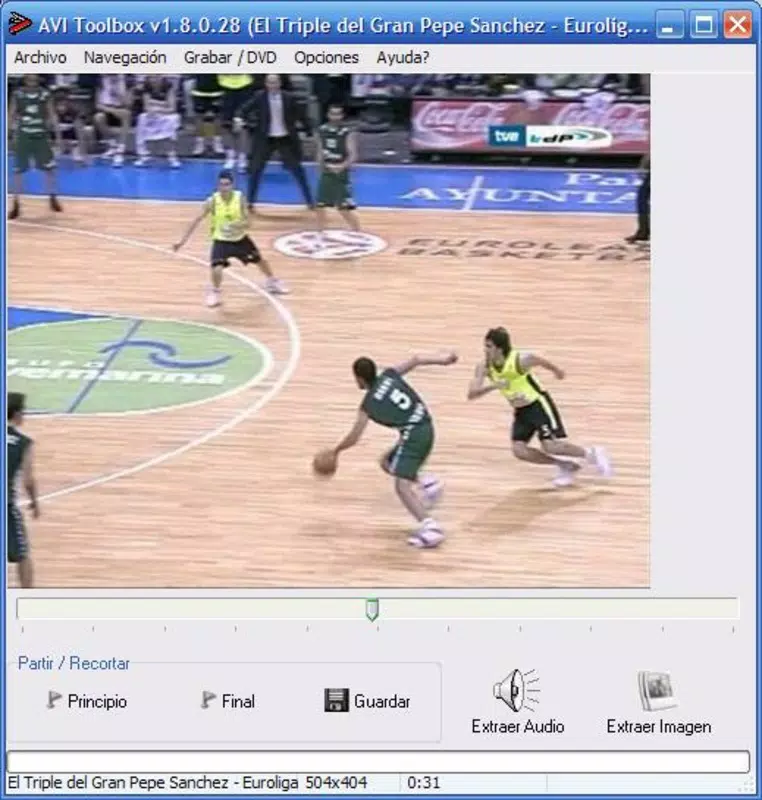
- Simple Interface: The app features a clean, minimal layout that enables users to load AVI files and select start and end points using a visual timeline. Even users without technical experience can navigate the tool with ease, reducing the learning curve associated with video editing.
- Audio and Video Extraction: Users can extract either audio or video content separately, or both simultaneously. This flexibility supports a wide range of use cases, from creating podcast snippets to saving memorable video moments.
- Frame Capture in BMP Format: The tool allows users to pause at any frame and export it as a BMP image. This is especially valuable for generating thumbnails, reference images, or visual assets for creative projects.
- Efficient Workflow: The entire process—from loading a file to exporting a clip or image—is designed to be completed in a few taps, minimizing time and effort.
- No Advanced Settings: While the lack of customizable parameters may limit power users, it ensures that the app remains accessible and intuitive for beginners.
For example, a student preparing a presentation could use AVI Toolbox to extract a 10-second clip from a lecture video and capture a key frame as a visual reference. Similarly, a social media user might extract background music from a video and save it as a standalone audio file for reuse. The tool’s focus on core tasks makes it a practical utility for everyday multimedia needs.
Interface, UX & Performance
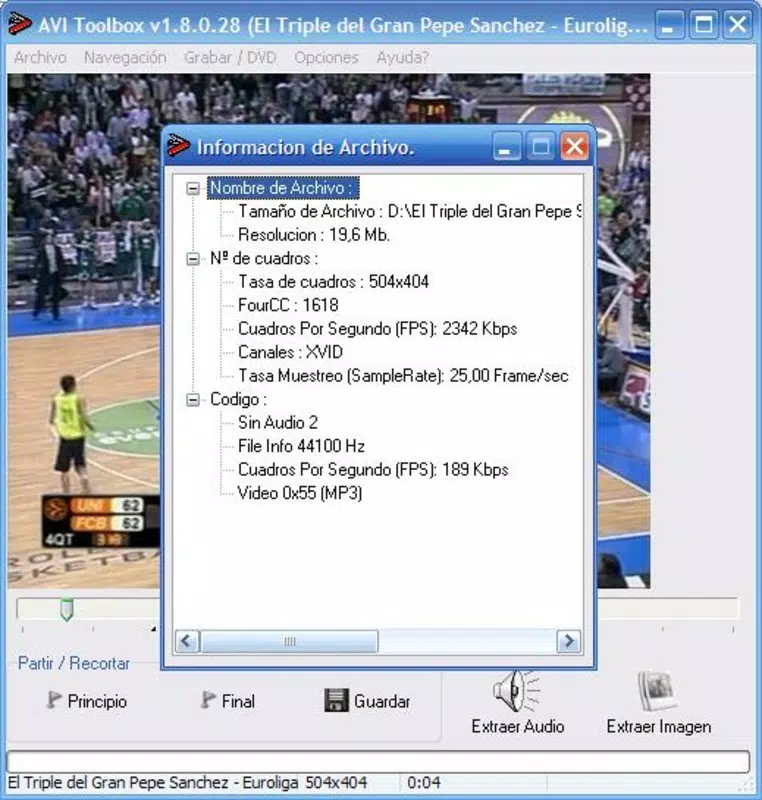
AVI Toolbox presents a minimalist interface centered around a timeline bar and clear action buttons. The visual design is functional rather than decorative, prioritizing usability over aesthetics. Navigation is linear and predictable: load file → set start/end points → choose export type → confirm and save.
This straightforward flow enhances user confidence, especially for those unfamiliar with video editing. The app responds promptly to touch inputs, with minimal lag during playback and selection. Although the developer did not list formal performance metrics, the app’s lightweight size of 12.4 MB suggests optimized resource usage, likely contributing to smooth operation on mid-range Android devices.
Responsiveness across screen sizes appears consistent, though specific compatibility details were not disclosed. Stability during file processing is not explicitly mentioned, but the absence of reported issues in the app’s release notes implies reliable behavior under normal conditions. The app does not display intrusive ads or unnecessary permissions, which enhances the user experience.
Overall, AVI Toolbox delivers a stable, focused interaction model that aligns with its utility-driven purpose. Users can expect consistent performance for basic extraction and capture tasks without system strain.
Platform Compatibility & Technical Requirements
AVI Toolbox is available exclusively on the Android platform. The app is compatible with Android devices running the version specified in the release details, though the exact minimum OS requirement was not listed by the developer. With a file size of 12.4 MB, the app is lightweight and suitable for devices with limited storage.
It is available for free, with no in-app purchases or subscription models reported. The app is designed for mobile use, and while it supports AVI files, no information was provided about other video formats or file size limits. The developer did not specify whether the app supports external storage access or cloud integration.
Compatibility with different Android device categories, including tablets and foldables, was not fully disclosed. The app’s release date of April 24, 2023, indicates it is a relatively recent entry in the mobile productivity space, suggesting it may not yet include support for newer Android features or APIs. Users should verify device compatibility through the official app store before installation.
Pros and Cons
Pros
- Lightweight design at only 12.4 MB, ideal for devices with limited storage.
- Simple, intuitive interface suitable for users of all skill levels.
- Efficient extraction of both audio and video segments from AVI files.
- Ability to capture and export individual frames in BMP format.
- Free to download and use with no hidden costs or ads reported.
Cons
- Only supports AVI files; no information on compatibility with other video formats.
- Limited to basic functionality—no advanced editing or customization options.
- Specific technical requirements such as minimum OS version were not disclosed.
- Frame export is restricted to BMP format, which may not suit all use cases.
- Developer did not provide details on file size limits or processing speed.
FAQ
Is AVI Toolbox safe to download and install?
Yes, the app is free and available through official Android channels. No malicious permissions or suspicious behavior have been reported.
Can I use AVI Toolbox on iOS devices?
Currently, the app is only available for Android. There is no official iOS version or plan announced by the developer.
Does AVI Toolbox support video formats other than AVI?
The app’s documentation does not specify support for formats beyond AVI. It is recommended to test with other file types to confirm compatibility.
Is there a limit to the size of video files I can process?
The developer did not disclose file size limitations. Users may encounter performance issues with very large files depending on device memory and processing power.
How often is AVI Toolbox updated?
The app was released on April 24, 2023. No information on update frequency or future feature plans was provided by the developer.
Final Thoughts
AVI Toolbox stands out as a focused, no-nonsense utility for Android users who need to extract video clips or capture frames from AVI files. Its simplicity, small size, and free access make it an appealing choice for individuals seeking quick solutions without the overhead of complex software. While it lacks advanced features and format flexibility, its strength lies in doing a few things exceptionally well.
The app is ideal for students, educators, content creators, and casual users who value speed and ease over customization. For those working with AVI files and needing basic editing tools on mobile, AVI Toolbox delivers a reliable, secure, and efficient experience. If you’re looking for a lightweight, free video tool that gets the job done without fuss, this app is worth trying.
Download AVI Toolbox now.


